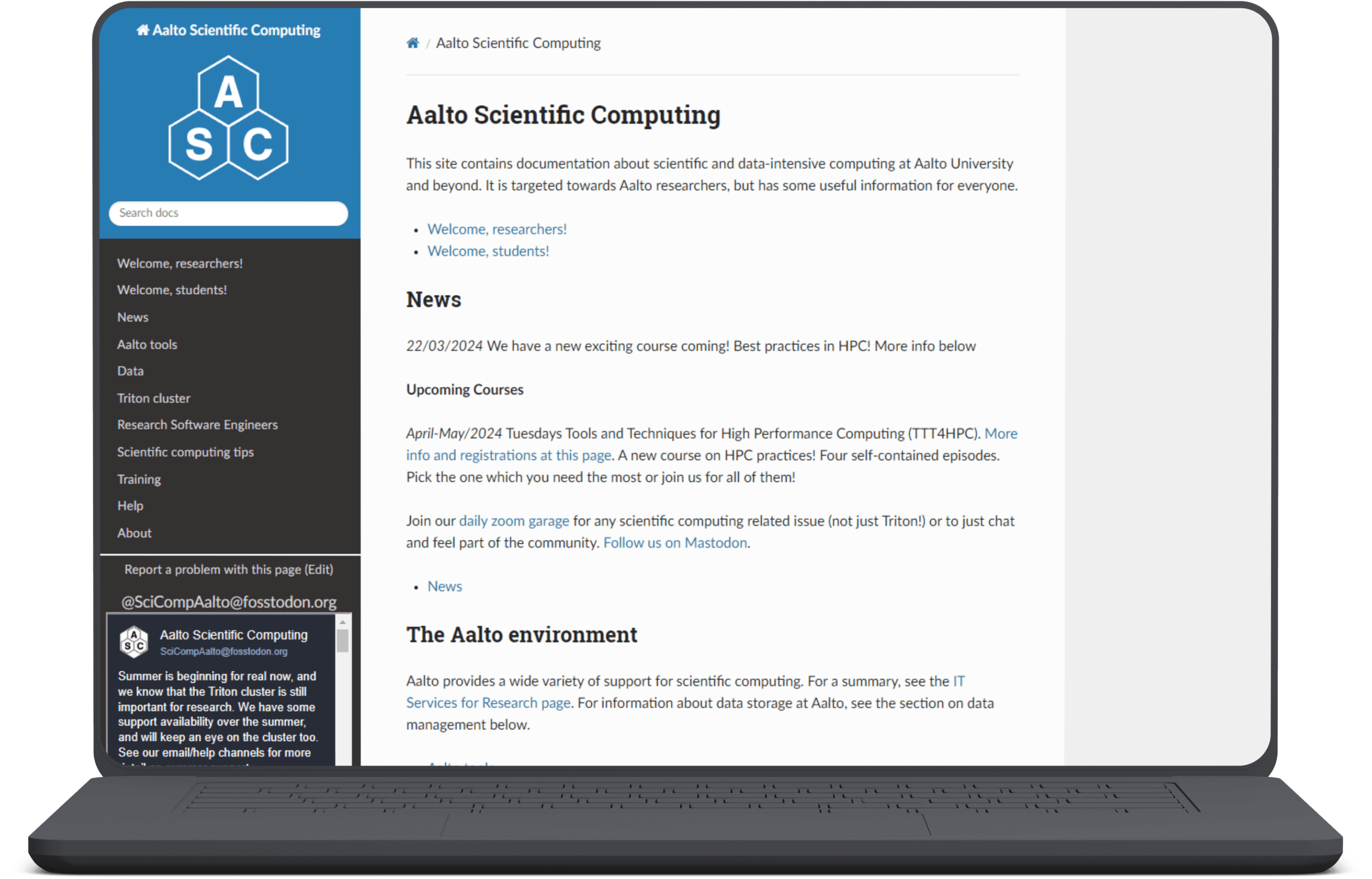
The primary objective of this study is to assess and enhance the usability of the Aalto Scicomp website, with a particular focus on novice users. This involves identifying key usability issues that hinder user experience and providing actionable recommendations to improve overall user satisfaction, effectiveness, and efficiency. The study employs a multi-phase approach: heuristic evaluation, user testing, and a collaborative workshop.
I was project lead in a group of four people tasked with conducting the usability evaluation for the website and was responsible for conducting and delivering the evaluation results timely while also reporting the results in an organised manner.
Timeline
The full timeline of the study was 4 months and was part of my Master's degree course of Collaborative Evaluation of user interfaces
Background
The Aalto Scicomp website serves as a critical resource for researchers at Aalto University, providing comprehensive documentation and support for utilizing large computational resources.
Given the complexity and volume of information presented on the site, ensuring its usability is paramount, especially for novice users who may not be familiar with the intricacies of computational tools and resources. This study aimed to evaluate and improve the usability of the Aalto Scicomp website, focusing on enhancing user satisfaction, effectiveness, and efficiency.
While trying to keep a user experience simple enough for users to understand, I inculcated the need for separation between E-Commerce and subscription box categories and helped introduce the credit system for trials in the subscription box. Through this method, users can build their trials box by buying credits and availing them using a familiar e-commerce checkout system.
I also advocated the use of an e-commerce platform for the partnered-up brands where people can buy actual products after they have tried their samples.
Phase 1 - Expert Evaluation
Using Jakob Nielsen’s 10 usability heuristics, our team independently reviewed the website to identify potential usability problems. This phase involved detailed documentation and classification of issues based on their impact on user experience.
Phase 2 - User Testing
Conducted in a controlled laboratory setting, this phase involved real users performing predefined tasks. We gathered both quantitative data (e.g., task completion times, error rates) and qualitative data (e.g., user interviews, observations). Participants completed a pre-test survey, the Post-Study System Usability Questionnaire (PSSUQ), and post-test interviews.
Phase 3 - Workshop
This workshop phase aimed to refine and prioritize the usability issues identified. Conducted in collaboration with another study group, the workshop included presentations, discussions, and collaborative activities to generate and prioritize improvement suggestions.
Phase 4 - Reporting
The resulting AI-powered scheduling app offers a seamless user experience, allowing individuals and businesses to effortlessly manage their schedules.
Goal
The main aim of the heuristic evaluation was to find ways to improve the user experience and discoverability of information on the website. We also aimed to focus on finding problems with the structure of the content.
Method Used
We utilized Heuristic Evaluation based on the 10 usability heuristics for user interface design by Jakob Nielsen*. Reason for choosing this method is because of its effectiveness in identifying usability problems in the user interface design, and allowing for a structured approach to evaluate the user experience.
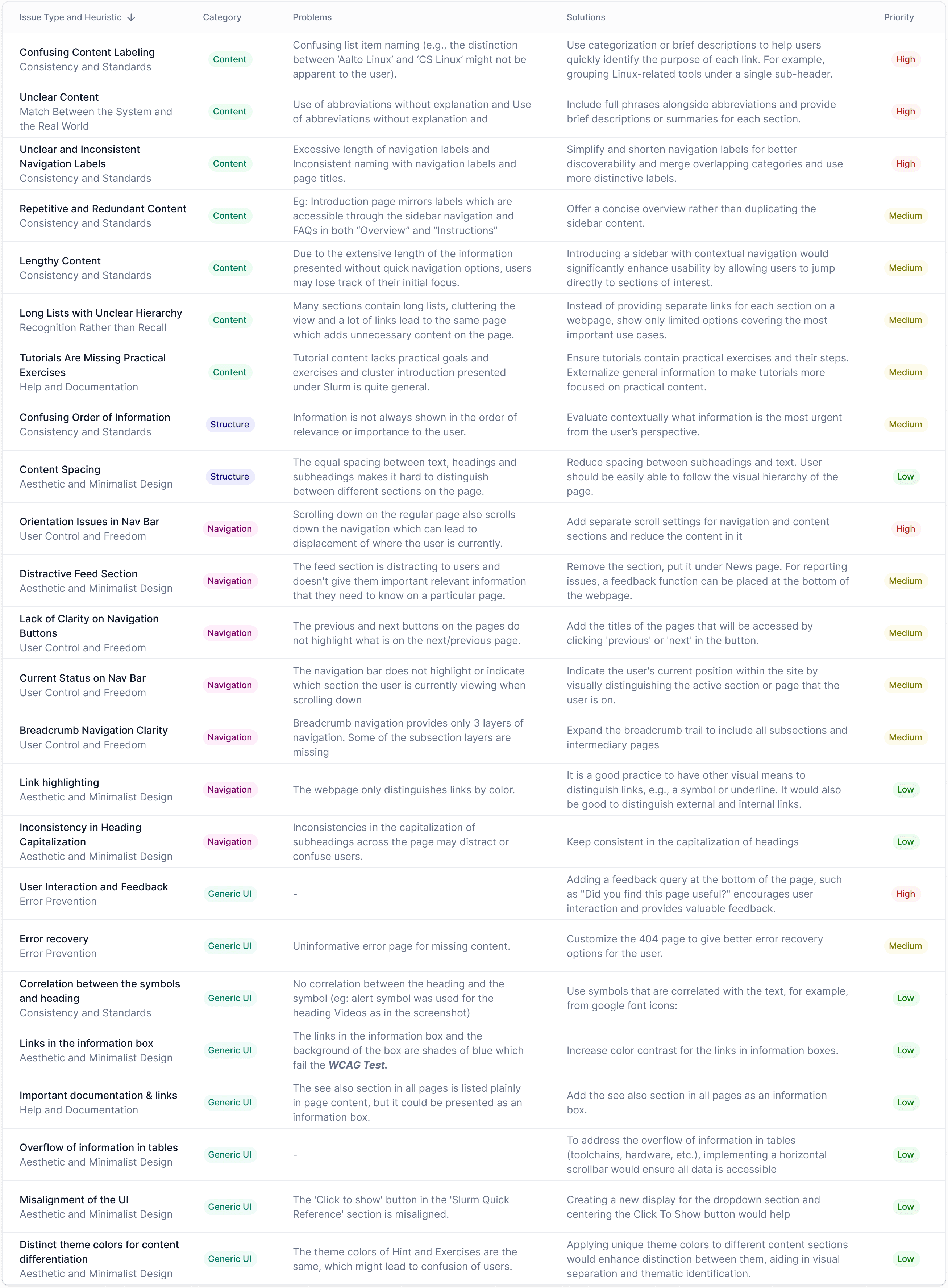
The quantitative feedback was captured using the Post-Study System Usability Questionnaire (PSSUQ), which is widely recognized for its reliability in measuring user satisfaction and usability aspects (Lewis, 2002). The questionnaire rates the results from 1 (most satisfied) to 7 (least satisfied), and these scores were then scaled from 0 (least satisfied) to 7 (most satisfied) for easy visualization. Additionally, for reporting we used a custom categorization for the questions as follows (using the adjusted scale 0-7)
Pre-test survey questions
What is your current role or position?
Have you ever used the Scicomp website before this study?
Estimating in years, how much experience do you have using the Scicomp website?
Do you use the Triton cluster as part of your current role?
How familiar are you with the Triton cluster?
How familiar are you with navigating technical documentation online?
User Tasks
Use 5 minutes to familiarize yourself with the Triton cluster.
You wish to gain access to the Triton cluster. Find the required information to obtain a Triton account.
You wish to find information on how to run calculations in the Triton cluster. Find the relevant documentation without using the search functionality or external resources.
You wish to parallelize an R script with OpenMP. Find relevant information or a reference from the SciComp documentation.
You wish to set up a python virtual environment on your computer. Find relevant information or a reference from the SciComp documentation.
You are facing an issue with connecting to the Triton cluster. Find the correct contact information from the SciComp documentation. Please write out who and how you would reach out about your issue on the task sheet.
a) Navigate to the Data-page from the top-level side navigation. Find the summary table at the bottom of the page.
b) You have a 10 GB dataset containing images and confidential information about 500 Finnish residents. Based on the table, which storage option would you use for storing this information? Please write your answer on the task sheet.
Pre-test survey questions
How easy or difficult did you find navigating the Scicomp documentation? Please explain.
How clear and accessible did you find the information about connecting to and using the Triton Cluster?
Did you encounter any issues while performing the tasks? If so, how did you attempt to resolve them?
Did the documentation provide all the necessary steps for completing the tasks? If not, what was missing?
What did you like most about the Scicomp documentation and the Triton Cluster interface?
How did you feel about navigating the documentation without the search functionality?
What improvements would you suggest for the documentation and interface based on your experience?
Would you feel confident using these resources in the future without assistance?
Any other comments or suggestions?
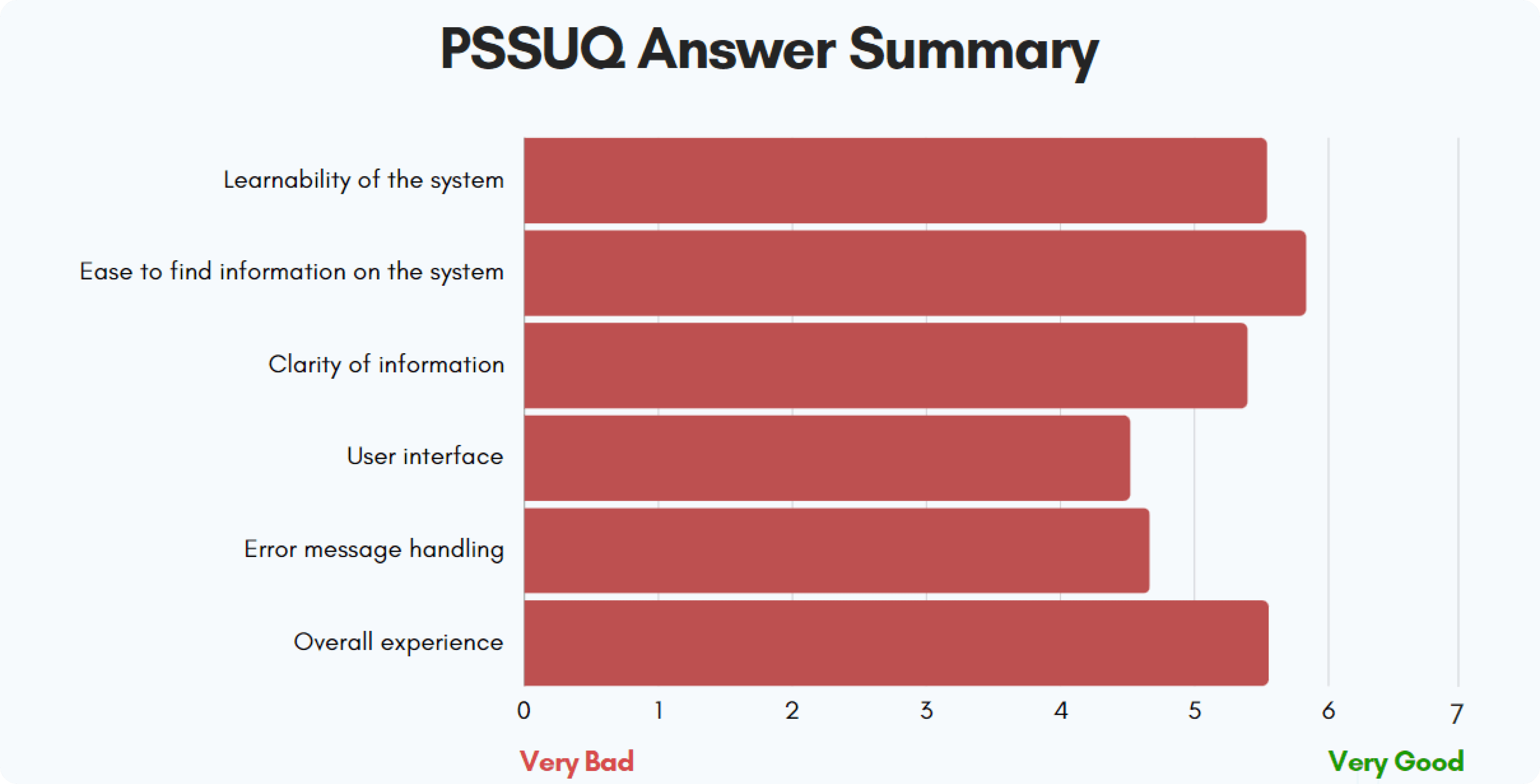
The combination of observations, user satisfaction scores, and user interviews provides a comprehensive view of the website's usability. This data was instrumental in guiding the subsequent phases of the project, particularly in prioritizing issues during the workshop phase for targeted improvements. The list of all issues and suggestions is given below :
While trying to keep a user experience simple enough for users to understand, I inculcated the need for separation between E-Commerce and subscription box categories and helped introduce the credit system for trials in the subscription box. Through this method, users can build their trials box by buying credits and availing them using a familiar e-commerce checkout system.
I also advocated the use of an e-commerce platform for the partnered-up brands where people can buy actual products after they have tried their samples.
Details of conduction
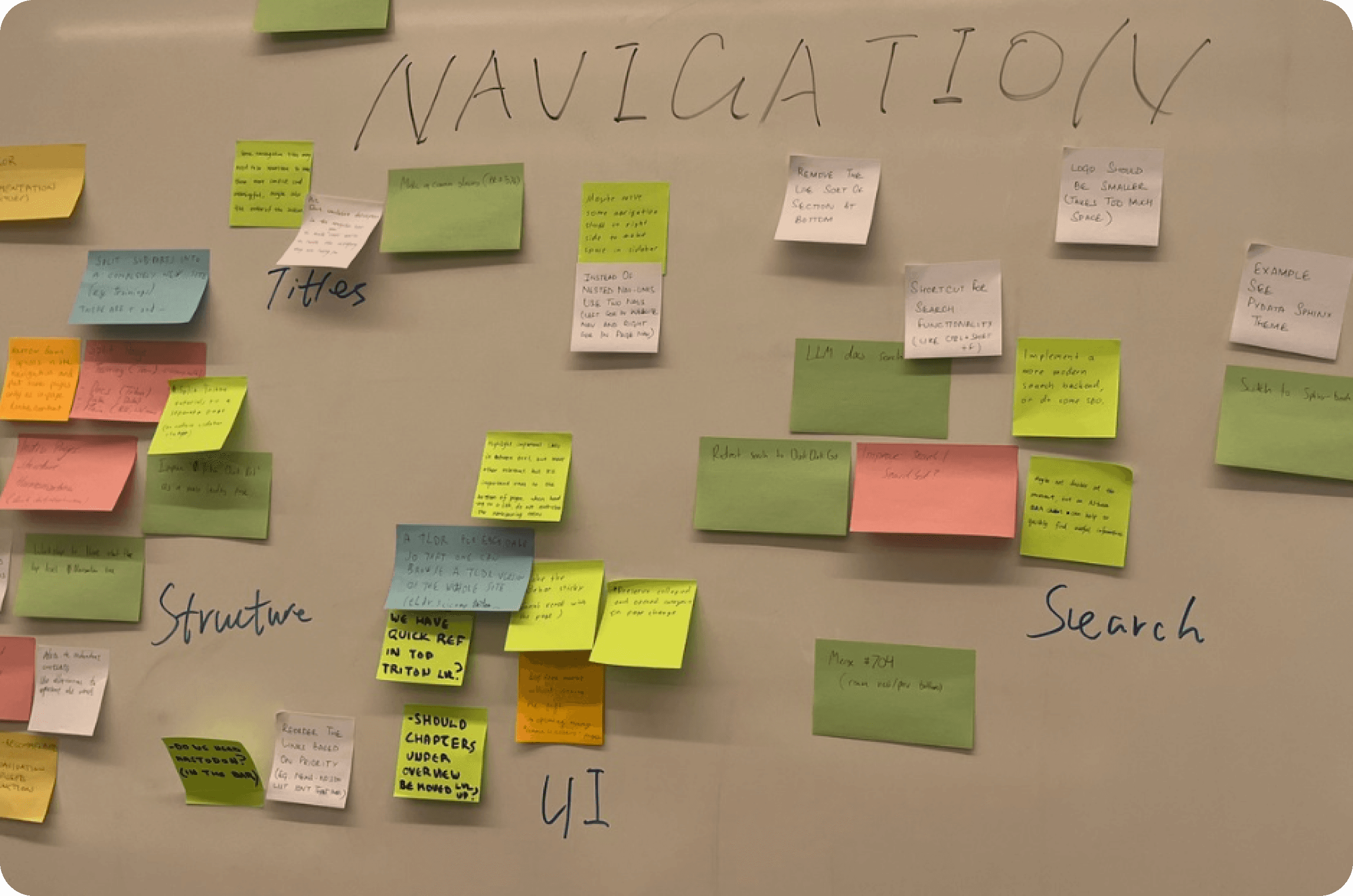
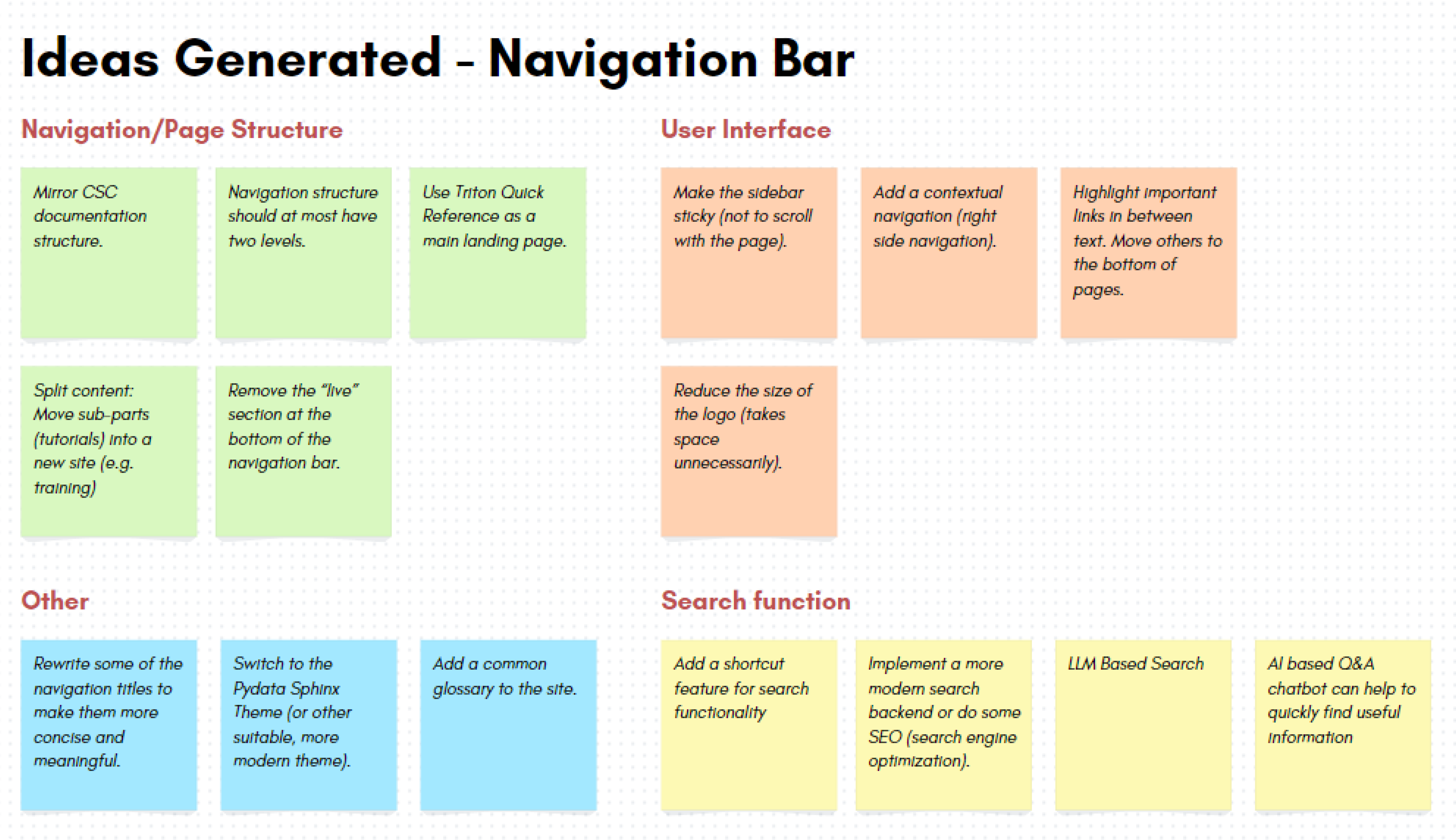
Conducted in collaboration with Group 3 to prioritize findings from usability evaluations. The customer (Aalto Scicomp reresentatives) were given a choice of topics to focus on and they decided on the most significant issue to work on: The focus chosen during the workshop was on improving navigation. We utilized the Post it notes-method where “participants individually generate content on sticky notes, then post them up on a wall. Contributions are then discussed.”
Goal of the workshop
The goal of the workshop is to share the evaluation findings with the customer and to produce improvement suggestions based on the most relevant findings from both groups. The High-level goal was How to make the website more approachable for new users?
In the heuristic evaluation, Nielsen’s 10 usability heuristics worked well overall, and many findings were replicated by several evaluators. However, during our analysis we found out that there was some variability in our interpretations of the heuristics, that is, evaluators had used different heuristics to classify specific findings. We believe that a more tailored set of heuristics could have yielded more consistent results. Although this issue caused more work for the study group during analysis, it should not be seen to have affected the reliability of the final evaluation results, as during the analysis the results were combined collaboratively. It would have been more severe to miss issues because of a too restricted or customized set of evaluation heuristics.
An obvious limitation of our user testing was the small sample size in the study. We only had 4 participants, one of which was not part of our target user group. Therefore, careful consideration should be used when analyzing the data and these results should not be seen as generalizable. Another factor to consider is the validity of the tasks selected for the user evaluation. These tasks were defined by the research group based on limited knowledge of the usage of the system, and therefore there exists a risk that these do not accurately reflect the actual usage of the documentation. Special attention should be given to task 4 (see Appendix B4): the topic mentioned in the task was unfamiliar to all participants, which could indicate that this information is not relevant for the target user group. This affects how the conclusions and suggestions relating to this information should be interpreted.
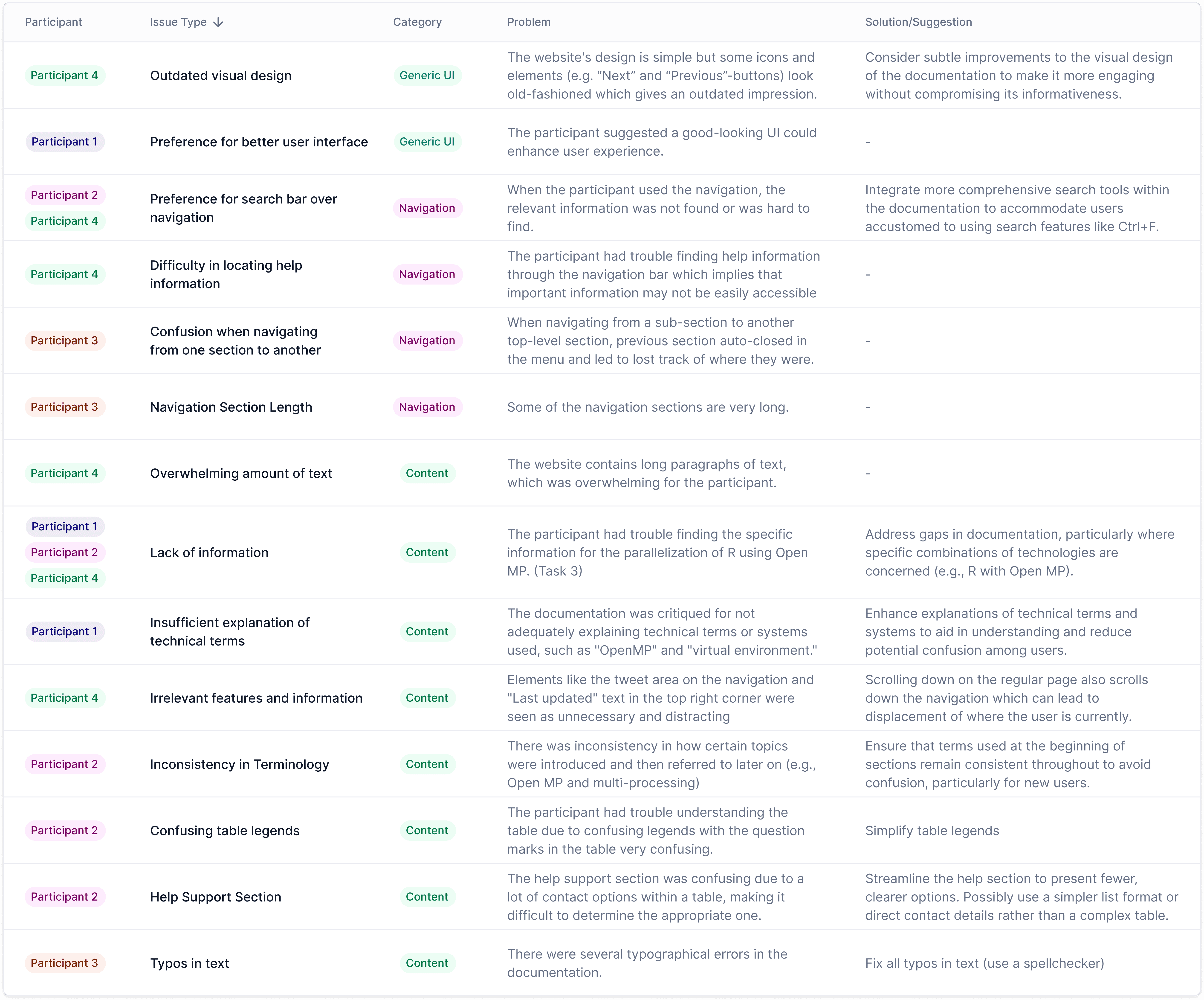
From our expert evaluation, we identified a total of 52 usability issues and good design choices. This count considers only the aggregated and combined findings from all the individual findings. User testing revealed 26 usability findings. The average time taken to complete the tasks was 38 minutes and 27 seconds, with 3 out of 4 users successfully finishing all tasks according to the provided instructions. During the workshop, we collected 32 improvement suggestions.